UFO-Track.com
Official Support & Documentation

UFO-Track Product Help & Troubleshooting

Select your UFO-Track device below for step-by-step setup instructions, Wi-Fi and USB configuration tools, QR codes, and operational tips.

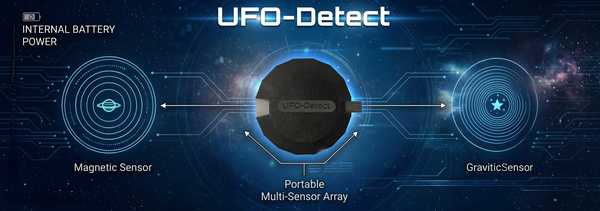
UFO-Detect - Portable Multi-Sensor Array
Portable Field Sensor

UFO-Detect

Portable Multi-Sensor Array

Featuring internal battery power along with dual magnetic and gravitic sensors, UFO-Detect is built for both portable field skywatching and continuous local anomaly monitoring.

UFO-CQ - The Nuts-And-Bolts CE5 Signaling Device
Optical Signaling

UFO-CQ

The Nuts-And-Bolts CE5 Signaling Device

Engineered for active night skywatch operations, transmitting structured mathematical and optical light sequences into the night sky.

🎥 UFO-Sense Unboxing & Setup Video

Watch our updated walkthrough covering 2.4 GHz Wi-Fi preparation, browser USB setup, the 5-beep connection confirmation, and the 60-second magnetic bump test:

🔌 Quick USB Browser Setup

Configuring your UFO-Sense unit over USB takes just a couple of minutes using our Web Serial setup utility:

  1. Have your 2.4 GHz Wi-Fi name and password (case-sensitive), cell phone number with country code (e.g., +15557778888), and latitude/longitude ready.
  2. Plug your device's built-in USB cable into your desktop or laptop computer.
  3. Open Chrome, Edge, Opera, or Brave and launch the setup portal below.
  4. Enter your details and click Save and Reboot. Listen for the 5 beeps confirming Wi-Fi connection!
Open USB Setup Tool (ufo-track.com/setup) →

💬 Need Additional Help With Your Device?

Write to us directly if you have any questions or need assistance configuring or testing your UFO-Sense, UFO-Detect, or UFO-CQ units.

Contact Us for Support →